How Senior Developers Read Documentation in Minutes (And Why Beginners Struggle)
10 min readProgramming with me
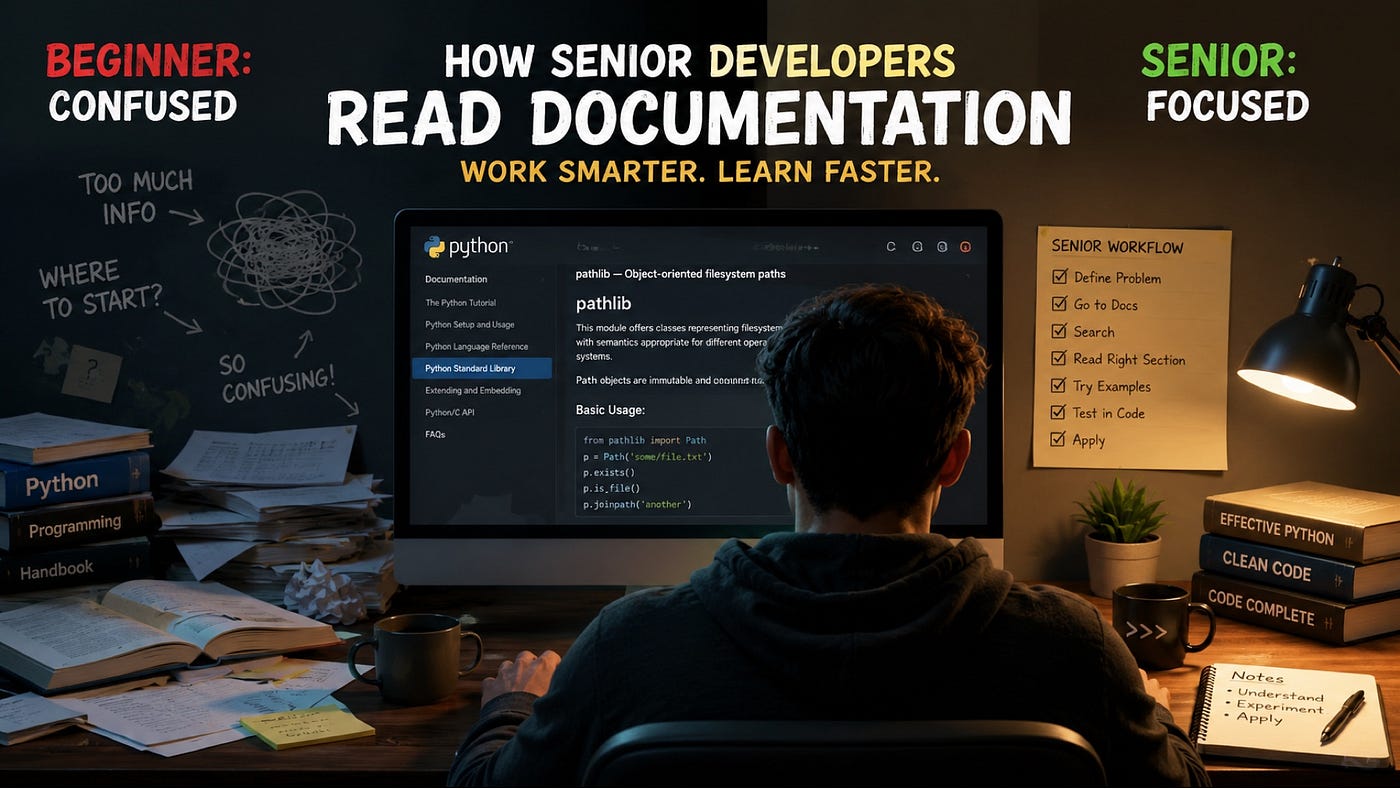
The faster way to understand Python docs – without reading everything.
Open the official Python documentation for the first time, and it can feel like reading a legal contract. Dense text, unfamiliar terms, no clear starting point.
Meanwhile, senior developers open the exact same page, find what they need in under a minute, and move on with their day.
The difference isn’t experience with that specific page. Most of the time, they’ve never even seen it before either. The difference is that they’ve learned how to read documentation, not just what it says.
This article breaks down that skill: how to read Python documentation efficiently, why beginners tend to struggle with it, and a reusable framework you can apply the next time you open any Python docs page.
The Biggest Myth About Documentation
A lot of beginners assume documentation is something you’re supposed to read once, understand fully, and remember forever.
That’s not how it works, even for developers with a decade of experience.
Senior developers refer back to documentation constantly – not because they’ve forgotten basic programming, but because documentation isn’t meant to be memorized. It’s meant to be a reference you return to exactly when you need it, for exactly the detail you need in that moment.
Nobody remembers every parameter of every function in the datetime module. What experienced developers remember is roughly what a module is capable of, and how to quickly find the specific detail they’ve forgotten.
That single mindset shift – from “I should know this” to “I should know where to look” – changes how the entire documentation-reading process feels.
Why Beginners Feel Overwhelmed
A few habits make Python documentation feel harder than it actually is.
Reading from top to bottom.
Documentation pages aren’t designed to be read like an article, start to finish. They’re designed to be searched and scanned for the specific piece you need.
Focusing on syntax instead of concepts. Beginners often get stuck trying to memorize exact syntax instead of first understanding what a function is actually for. Once you understand the concept, the syntax becomes much easier to look up and remember.
Skipping the examples. Official Python documentation almost always includes short code examples, and they’re often the fastest way to understand a function – faster than reading the full technical description above them.
Fear of “official” sources. Many beginners default to tutorials and blog posts, assuming official documentation is only for advanced developers. In reality, Python’s documentation is written to be usable by anyone, and it’s often clearer than the third-party explanation you’d find elsewhere.
Pro Tip: Whenever you’re unsure about a function, check the official docs first, even if you also read a tutorial afterward. Tutorials can go outdated; official documentation is maintained alongside the language itself.
How Senior Developers Actually Read Documentation
Here’s the practical workflow experienced developers tend to follow, whether or not they’ve ever described it explicitly.
The difference becomes much easier to understand visually:
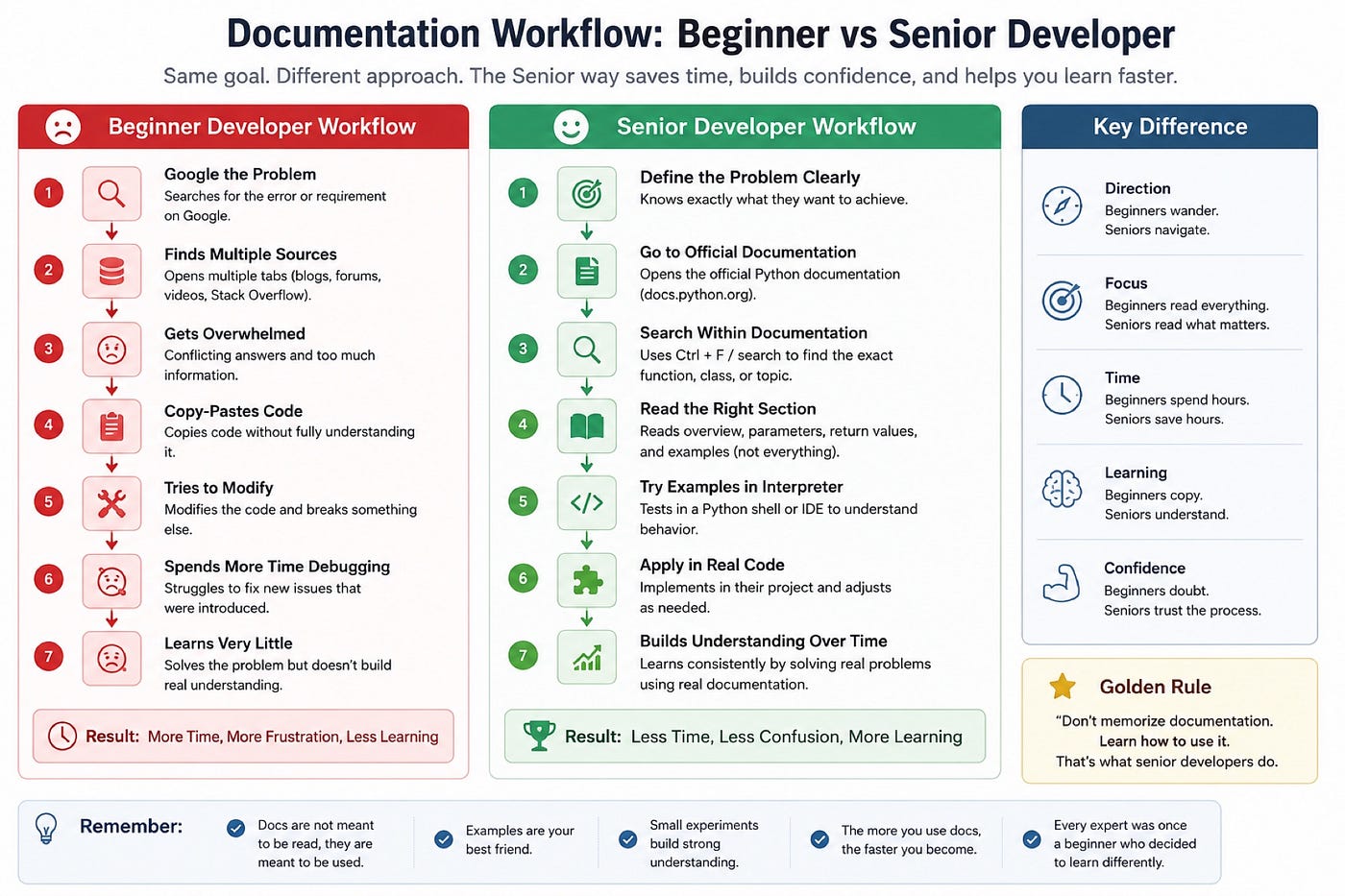
Start with the overview. Before touching a specific function, they skim the module’s introduction to understand what problem it solves in general.
Identify the specific problem. They know exactly what they’re trying to accomplish before opening the docs – “I need to format a date,” not “let me learn everything about dates.”
Read the function or class they need. They go directly to the relevant function, skipping unrelated sections entirely.
Understand the parameters. They check what inputs the function expects, and which ones are optional.
Read the return values. They confirm what the function actually gives back, since using a return value incorrectly is a common source of bugs.
Study the official examples. They read the example code before the surrounding paragraph, since it usually answers the question faster.
Experiment in a Python interpreter. They test the function with real values immediately, rather than assuming they understood it correctly from reading alone.
Apply it in a small project. They use the function in actual code right away, since applying something is what makes it stick.
This isn’t a formal process anyone was taught in a classroom. It’s just what naturally happens once you’ve done it enough times.
Real Python Documentation Walkthrough
Let’s apply this to three real modules from Python’s standard library.
pathlib
What it does: pathlib provides an easier, more readable way to work with file paths compared to older string-based methods.
from pathlib import Path

folder = Path("documents")
file = folder / "notes.txt"

print(file)
print(file.exists())
Line by line: Path(“documents”) creates a path object representing a folder. The / operator joins paths together in a way that reads naturally, producing documents/notes.txt. file.exists() checks whether that path actually exists on your system, returning True or False.
How a beginner should navigate this page: Skip the full introduction at first. Search the page for “exists” using Ctrl+F, read that one method’s description, glance at any example directly below it, and move on. You don’t need to understand the entire pathlib module to use one method correctly.
Don’t try to memorize this code. Focus on understanding why it works. That’s the habit experienced developers build.
datetime
What it does: datetime handles dates and times – creating them, formatting them, and calculating differences between them.
from datetime import datetime

now = datetime.now()
formatted = now.strftime("%Y-%m-%d")

print(formatted)
Line by line: datetime.now() returns the current date and time. strftime(“%Y-%m-%d”) formats that into a readable string – year, month, day – using a format code most developers look up rather than memorize.
How a beginner should navigate this page: Don’t try to memorize every format code (%Y, %m, %d, and so on) on your first read. Instead, bookmark the formatting table and return to it whenever you need a specific format. Even experienced developers look this table up regularly.
json
What it does: json converts Python data into JSON format (commonly used for APIs and data storage) and back again.
import json

data = {"name": "Alex", "age": 25}
json_string = json.dumps(data)

print(json_string)
Line by line: json.dumps(data) converts a Python dictionary into a JSON-formatted string. The reverse function, json.loads(), converts a JSON string back into a Python dictionary.
How a beginner should navigate this page: Look specifically for dumps and loads first, since they cover the vast majority of everyday use cases. The rest of the module handles more advanced formatting options you likely won’t need right away.
Documentation Reading Framework
Here’s a simple framework you can reuse every time you open Python documentation:
- Define your exact question before opening the page – “how do I do X,” not “let me learn this module.”
- Search, don’t scroll. Use Ctrl+F to jump straight to the relevant term.
- Read the example first, then the explanation above it if needed.
- Check the parameters and return value specifically – this is where most confusion actually lives.
- Test it immediately in a Python interpreter with your own values.
- Use it in real code the same day, if possible, so it actually sticks.
Pro Tip: Keep a personal notes file with short code snippets you look up often. Over time, this becomes faster than searching documentation for things you use regularly.
Common Mistakes Beginners Make
- Reading documentation like a novel, front to back, instead of searching for what they need.
- Avoiding official docs entirely, relying only on tutorials that may be outdated.
- Skipping code examples, even though they usually explain a function faster than the prose does.
- Trying to memorize every parameter instead of learning where to look them up.
- Not testing code immediately after reading about it, which weakens retention.
- Assuming every parameter is required, without checking which ones are optional.
- Ignoring the return value section, then being confused why their code doesn’t behave as expected.
- Giving up too quickly when a documentation page feels dense, instead of narrowing the search.
- Not using Ctrl+F, and instead scrolling manually through long pages.
- Treating official documentation as “advanced only,” when it’s written to be accessible to everyone.
Mini Practice Challenge
Try this on your own before moving to the next section.
Task: Using Python’s official datetime documentation, write a small script that prints today’s date in the format Day-Month-Year (for example, 07-July-2026).
Don’t look up a tutorial for this. Open the official datetime documentation, search for strftime, read the formatting codes table, and figure it out yourself.
This single exercise practices the entire framework above: defining a clear question, searching instead of scrolling, and testing your result.
Python Learning Roadmap
Once reading documentation feels comfortable, here’s a natural next path:
Standard Library – explore other built-in modules like **os, random, and collections using the same reading approach.
Virtual Environments – learn to isolate project dependencies using venv, which becomes essential once you install external packages.
Packages – learn to install and read documentation for third-party packages via pip, applying the same framework to non-official docs.
APIs – learn to send and receive data from external services, often using the requests package alongside official API documentation.
Flask or FastAPI – build small web applications, which will require you to read framework-specific documentation regularly.
Testing – learn to write tests using unittest or pytest, both of which have documentation worth getting comfortable navigating.
Projects – apply all of it in real projects, since documentation skills improve fastest through actual use, not passive reading.
Quick Checklist
Before closing any documentation page, check that you’ve:
- Defined exactly what you were trying to find
- Searched for the specific term instead of scrolling from the top
- Read the example code, not just the description
- Checked the parameters and return value
- Tested the code with your own values
- Used it in a real script, even a small one
Key Takeaways
- Documentation isn’t meant to be memorized – it’s meant to be searched efficiently when you need a specific detail.
- Beginners struggle less with the content of documentation and more with how they approach reading it.
- Senior developers read documentation by defining their question first, then searching directly for the answer.
- Code examples in documentation are often faster to understand than the surrounding explanation text.
- Testing a function immediately after reading about it is what actually makes the knowledge stick.
FAQ
Is official Python documentation good for beginners? Yes. It’s written to be accessible, and it’s the most reliable, up-to-date source available, even for those just starting out.
Should I read the entire documentation page before using a function? No. Search for the specific function you need, read its example and parameters, and move on. Full-page reading is rarely necessary.
How do I remember all the parameters for common functions? You don’t need to. Experienced developers look up parameters regularly. What matters is knowing where to find them quickly.
What’s the fastest way to understand a new Python module? Read the module’s short overview, then jump straight to the specific function you need and study its example code.
How can I get faster at reading documentation? Practice using the framework above regularly. Speed comes from repetition, not memorization.
Conclusion
Reading Python documentation well isn’t about intelligence or years of experience – it’s a specific, learnable skill built through repetition. Define your question, search instead of scroll, read the examples, test what you find, and apply it in real code.
The best developers aren’t the ones who remember the most. They’re the ones who know how to find the right answer quickly – and understand it well enough to use it with confidence.
The more often you open the official Python documentation instead of avoiding it, the faster and more natural this process becomes.
More in programming


Cubed
Write about the technologies shaping the future.
For developers, founders, and curious minds exploring AI, crypto, Web3, and emerging tech—signal over noise.
One free account across In Plain English, Stackademic, Venture, and Cubed.
How it works- AI, crypto & Web3
- Software & emerging technologies
- Analysis & practical resources
- Thoughtful voices, not hype
Sign in
Google or GitHub
Complete profile
Takes a few minutes
Get approved & publish
Start sharing
Why write for Cubed?
The future deserves thoughtful voices, not just louder headlines.
Comments
Loading comments…