Privacy, Local LLMs, and the End of the Administrative Tax
5 min readShreyansh Shukla
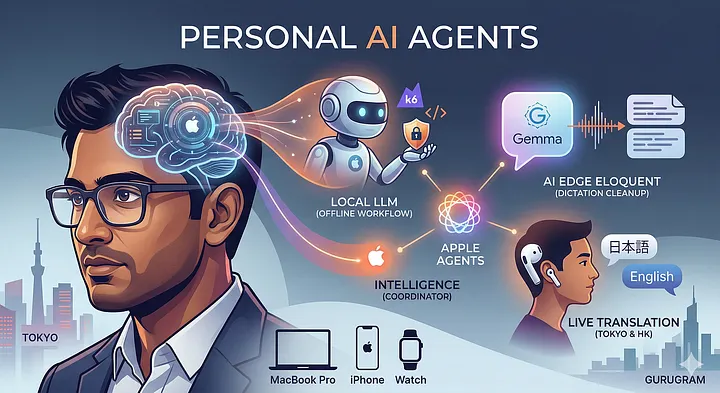
For me as an engineer in the game, productivity used to be a badge of honor earned through brute force. But in 2026, the paradigm has shifted.
I no longer just use my MacBook and iPhone, I operate them through a layer of Personal AI Agents.
This isn’t about showing off a collection of hardware. In fact, if I could achieve this level of efficiency on a calculator, I would. This is about system optimisation reducing the administrative tax of being a professional so I can focus on high level strategy and personal peace.
1. The Professional Brain: Local LLMs for Engineering
Privacy and latency are the enemies of a smooth workflow. While cloud AIs are great for general knowledge, my core engineering strategy for the TestWithShreyansh cohort lives on a Local LLM running via Ollama on my M-series Mac.
- The Before: Analysing p99 latency spikes meant manually scouring logs in Grafana. I’d spend hours writing regex patterns, always hesitant to upload raw logs to the cloud due to security protocols.
- The After: I run a quantised Llama 3.2 model entirely offline. It reads my local documentation and suggests fixes in k6 or Gatling script format.
- The Agent Moment: I’ve built a number of mac/iphone shortcuts that watches a specific folder. When I drop a raw performance report there, the local LLM automatically triggers, parses the data, and writes a Root Cause Analysis (RCA) draft all while I’m offline during a flight.
Tool Insight: Ollama allows you to run powerful models locally, ensuring your proprietary code and logs never leave your machine.
2. Google AI Edge Eloquent: The End of Mental Tabs
Communication is often where engineers lose the most time. Google AI Edge Eloquent has fundamentally changed how we bridge the gap between raw thoughts and professional documentation.
- The Before: After a guest lecture at LPU or a brainstorming session, I’d spend an hour cleaning up my notes, removing the filler words and circular thoughts.
- The After: Using Eloquent on my iPhone, I record my raw thoughts while driving through Gurugram. It uses on-device Gemma based AI to transcribe and more importantly reformulate that speech.
- The Use Case: I can dictate a complex performance strategy while walking. By the time I sit at my desk, Eloquent has synced a polished, bulleted summary to my MacBook. It ignores the ums and ahs, delivering only the logic.
3. Global Living: Japan, Hong Kong, and the Language Gap
My recent trip was the ultimate litmus test for AI assisted living. I transitioned from a tourist to an almost native using real-time translation agents.
- Real-Time Conversations: In Tokyo’s Ginza district, I used AirPods Pro with Live Translation. When speaking to a shopkeeper, the AI translated his Japanese directly into my ears. No awkward pauses, no showing a screen. And, it actully worked.
- Intelligent Shopping: Using Google Lens with Edge AI, I scanned complex product labels. It didn’t just translate, it checked ingredients against my stored preferences, acting as a filter for my specific needs.
- The Relaxed Itinerary: I used Mindtrip AI to build a hotel centric plan. I prompted: Build a relaxed stay for Tokyo. Prioritise high end hospitality over tourist traps. The agent analysed the travel data and built a schedule that felt like a vacation, not a marathon.
4. The Unified Agent: Apple Shortcuts & Siri
The most significant shift is Apple Intelligence acting as a coordinator. My devices are now a unified command center.
- Resource Agent: If a participant asks for a resource, I simply tell Siri, send the k6 advanced framework PDF to the new lead*.*
- The Logic: This is a chain of Apple Shortcuts that finds the file via Spotlight, verifies the version with on-device AI, and automates the Slack delivery.
- Focus Intelligence: My devices know when I’m at home vs. the office. That automatically trigger Focus Modes and filter out all but the most urgent pings, allowing me Deep Work time to author content for the next cohort.
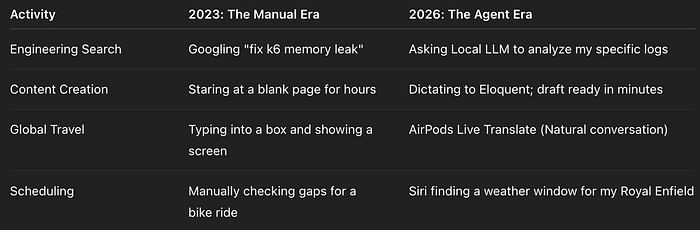
Efficiency Comparison: The Generational Shift
A Fun Final Note: It’s Not About the Gear
While I’ve mentioned my MacBook and iPhone, this article isn’t an ad for the Apple ecosystem. If these same optimisations were available on a different platform tomorrow, I’d be there.
The goal is Cognitive Offloading. I want my devices to handle the how so I can focus on the Why. By delegating the mundane, the scheduling, the initial drafting, the log filtering, and the translation, I’ve gained something far more valuable than a faster workflow.
I’ve gained the headspace to be a better engineer, a better mentor, and a more present human.
The future isn’t a better app, it’s a better assistant. Are you ready to delegate?
Recommended Reading:
- RCA & Culture — Preventing the Next Outage, Not Just Fixing the Last One.
- TestWithShreyansh — Professional SDET and Performance Engineering cohorts.
More in artificial-intelligence




Cubed
Write about the technologies shaping the future.
For developers, founders, and curious minds exploring AI, crypto, Web3, and emerging tech—signal over noise.
One free account across In Plain English, Stackademic, Venture, and Cubed.
How it works- AI, crypto & Web3
- Software & emerging technologies
- Analysis & practical resources
- Thoughtful voices, not hype
Sign in
Google or GitHub
Complete profile
Takes a few minutes
Get approved & publish
Start sharing
Why write for Cubed?
The future deserves thoughtful voices, not just louder headlines.

Comments
Loading comments…