I Built an AI Assistant That Turns Messy Human Requests Into Real Tasks
How I used AI to understand vague instructions, ask better questions, and automate work like a smart teammate
4 min readAhmad Tariq
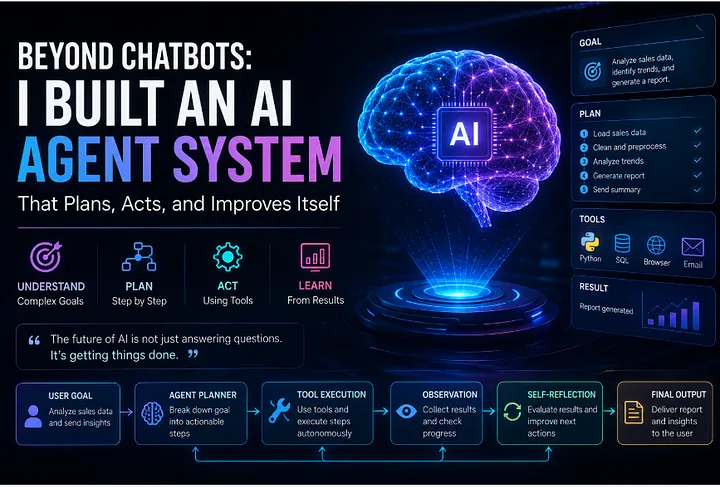
Most people think AI is powerful because it can answer questions.
I think AI becomes powerful when it can understand messy people.
Because real people do not write perfect prompts.
They say things like:
Make this better. Fix the report. Send it professionally. Find something good. Make it look less boring. Do it like last time. You know what I mean.
And honestly, that is where most AI apps break.
A basic chatbot needs clean instructions. A useful AI assistant should understand intent, extract missing details, turn the request into tasks, and produce something usable.
So I built a small AI workflow that does exactly that.
1. The real problem: people do not speak in structured data
Developers love clean inputs.
Users do not.
A user might say:
Make a professional email for my teacher about assignment submission
But inside that one sentence, there are hidden tasks:
Who is the recipient? What is the subject? Is it formal or simple? Is it individual or group submission? Should it mention attachment? Should it sound humble?
So the first job of AI is not answering.
The first job is understanding.
from dataclasses import dataclass
from typing import List, Optional

@dataclass
class UserRequest:
    raw_text: str
    detected_intent: Optional[str] = None
    required_outputs: Optional[List[str]] = None
    missing_details: Optional[List[str]] = None
    tone: Optional[str] = None

request = UserRequest(
    raw_text="Make a professional email for my teacher about assignment submission"
)
print(request)
This is where the workflow starts.
Instead of rushing to generate the final answer, the assistant first converts human language into structured meaning.
That one step makes the output much better.
2. Create an intent detector
The assistant needs to know what the user actually wants.
Is the user asking for writing? Research? Summarization? Coding? Planning? Automation?
Here is a simple rule-based intent detector.
In real projects, I would use an LLM or classifier, but simple logic is enough to understand the idea.
class IntentDetector:
    def __init__(self):
        self.intent_keywords = {
            "email_writing": ["email", "mail", "send", "teacher", "subject"],
            "document_editing": ["fix", "rewrite", "improve", "humanize", "report"],
            "job_search": ["job", "cv", "resume", "apply", "hiring"],
            "coding_help": ["code", "python", "javascript", "error", "bug"],
            "presentation": ["ppt", "slides", "presentation"],
            "study_help": ["explain", "exam", "viva", "chapter", "concept"]
        }
def detect(self, text: str) -> str:
        text_lower = text.lower()
        scores = {}
        for intent, keywords in self.intent_keywords.items():
            score = sum(1 for keyword in keywords if keyword in text_lower)
            scores[intent] = score
        best_intent = max(scores, key=scores.get)
        if scores[best_intent] == 0:
            return "general_request"
        return best_intent

detector = IntentDetector()
examples = [
    "Make an email for assignment submission",
    "Fix this report and make it human",
    "Explain chapter 3 for my viva",
    "Python code error solve karo"
]
for example in examples:
    print(example, "->", detector.detect(example))
This looks simple, but it teaches an important lesson:
AI systems should not treat every request the same way.
A job search request needs research. A viva request needs simple explanation. An email request needs tone control. A coding request needs debugging.
Same assistant. Different mode.
3. Extract the missing details before generating
This is where many AI tools become annoying.
They either ask too many questions or assume too much.
A better system should detect only the important missing details.
class MissingDetailExtractor:
    def get_missing_details(self, intent: str, text: str) -> List[str]:
        text_lower = text.lower()
        missing = []
if intent == "email_writing":
            if "teacher" not in text_lower and "sir" not in text_lower and "ma'am" not in text_lower:
                missing.append("recipient")
            if "assignment" not in text_lower and "report" not in text_lower:
                missing.append("purpose")
            if "group" not in text_lower and "individual" not in text_lower:
                missing.append("submission type")
        if intent == "job_search":
            if "lahore" not in text_lower and "karachi" not in text_lower:
                missing.append("location")
            if "call center" not in text_lower and "sales" not in text_lower:
                missing.append("preferred job type")
        if intent == "document_editing":
            if "simple" not in text_lower and "professional" not in text_lower:
                missing.append("writing style")
        return missing

extractor = MissingDetailExtractor()
text = "Make an email for assignment submission"
intent = detector.detect(text)
missing = extractor.get_missing_details(intent, text)
print("Intent:", intent)
print("Missing:", missing)
The goal is not to interrogate the user.
The goal is to avoid bad assumptions.
Pro tip: A smart assistant should ask fewer questions, but better questions.
4. Add tone detection because tone changes everything
The same message can sound professional, friendly, confident, humble, or desperate.
And yes, users notice.
For example:
I am submitting the assignment.
is very different from:
Kindly find attached our assignment for your review.
Tone matters because AI is not only generating text. It is representing the person.
class ToneDetector:
    def detect_tone(self, text: str) -> str:
        text_lower = text.lower()
if any(word in text_lower for word in ["teacher", "ma'am", "sir", "university"]):
            return "formal and respectful"
        if any(word in text_lower for word in ["job", "cv", "hiring", "interview"]):
            return "professional and confident"
        if any(word in text_lower for word in ["friend", "casual", "whatsapp"]):
            return "friendly and natural"
        if any(word in text_lower for word in ["exam", "viva", "explain"]):
            return "simple and supportive"
        return "clear and helpful"

tone_detector = ToneDetector()
print(tone_detector.detect_tone("Write email to ma'am for assignment submission"))
print(tone_detector.detect_tone("Make voice message for call center job"))
This small step improves output more than people expect.
A good AI assistant should not only answer correctly. It should answer in the right voice.
5. Convert the request into an action plan
Now the assistant can create a plan.
This is where the AI becomes useful.
Not just:
Here is your answer.
But:
I understand what you want, here are the steps, and here is the final output.
@dataclass
class ActionPlan:
    intent: str
    tone: str
    steps: List[str]
    missing_details: List[str]

class ActionPlanner:
    def create_plan(self, request: UserRequest) -> ActionPlan:
        steps = []
        if request.detected_intent == "email_writing":
            steps = [
                "Identify purpose of the email",
                "Use respectful opening",
                "Mention assignment submission clearly",
                "Keep body short and professional",
                "Add polite closing"
            ]
        elif request.detected_intent == "job_search":
            steps = [
                "Read candidate profile",
                "Find relevant jobs",
                "Check company credibility",
                "Match jobs with skills",
                "Prepare final shortlist"
            ]
        elif request.detected_intent == "study_help":
            steps = [
                "Break topic into simple parts",
                "Explain key terms",
                "Give exam-style answer",
                "Add common viva questions",
                "Summarize final points"
            ]
        else:
            steps = [
                "Understand request",
                "Choose best format",
                "Generate useful response",
                "Review for clarity"
            ]
        return ActionPlan(
            intent=request.detected_intent,
            tone=request.tone,
            steps=steps,
            missing_details=request.missing_details or []
        )
This is the difference between a chatbot and a workflow assistant.
A chatbot reacts. A workflow assistant organizes.
And people love tools that reduce mental load.
6. Build the final assistant engine
Now we combine everything.
class HumanFriendlyAIAssistant:
    def __init__(self):
        self.intent_detector = IntentDetector()
        self.detail_extractor = MissingDetailExtractor()
        self.tone_detector = ToneDetector()
        self.planner = ActionPlanner()
def understand(self, text: str) -> UserRequest:
        intent = self.intent_detector.detect(text)
        missing_details = self.detail_extractor.get_missing_details(intent, text)
        tone = self.tone_detector.detect_tone(text)
        return UserRequest(
            raw_text=text,
            detected_intent=intent,
            required_outputs=["final_response"],
            missing_details=missing_details,
            tone=tone
        )
    def process(self, text: str) -> ActionPlan:
        request = self.understand(text)
        plan = self.planner.create_plan(request)
        return plan

assistant = HumanFriendlyAIAssistant()
user_text = "Make a professional email for my teacher about assignment submission"
plan = assistant.process(user_text)
print("Intent:", plan.intent)
print("Tone:", plan.tone)
print("Missing details:", plan.missing_details)
print("Steps:")
for step in plan.steps:
    print("-", step)
This engine is still simple, but the thinking is advanced.
It does not immediately generate. It understands first.
That is how better AI products are built.
7. Make the response feel human, not robotic
Now comes the important part: final output.
The assistant should not sound like a legal notice unless the user needs that.
For example, if the user asks for an assignment submission email, the output should be simple, respectful, and natural.
class ResponseGenerator:
    def generate_email_submission(self, student_names: str = "our group") -> str:
        return f"""
Subject: Assignment SubmissionRespected Ma'am,
I hope you are doing well. Please find attached our assignment for your review.
This assignment is submitted by {student_names}. We have completed it according to the given instructions.
Thank you for your time and guidance.
Regards,
{student_names}
"""
    def generate_study_response(self, topic: str) -> str:
        return f"""
Let's understand {topic} in simple words.
First, I will explain the basic meaning.
Then I will explain the important points.
After that, I will give you a viva-style answer.
The goal is not just to memorize it.
The goal is to explain it confidently in your own words.
"""
generator = ResponseGenerator()
print(generator.generate_email_submission("Waqar and group members"))
The best AI writing does not feel over-polished.
It feels useful.
That is the sweet spot.
8. Final thoughts
The most engaging AI tools are not the ones that use the biggest model.
They are the ones that understand people better.
Because people are messy. People are vague. People change their minds. People say “make it better” and expect the assistant to understand the whole universe behind that sentence.
A useful AI assistant should detect intent, identify missing details, choose the right tone, create an action plan, and then generate the response.
That is how AI becomes more than a chatbot.
It becomes a teammate.
Not a perfect teammate. Not a magical robot. But a practical one that reduces confusion and saves time.
And honestly, that is where AI becomes exciting.
Not when it sounds smart.
But when it understands what people actually need.
More in artificial-intelligence




Cubed
Write about the technologies shaping the future.
For developers, founders, and curious minds exploring AI, crypto, Web3, and emerging tech—signal over noise.
One free account across In Plain English, Stackademic, Venture, and Cubed.
How it works- AI, crypto & Web3
- Software & emerging technologies
- Analysis & practical resources
- Thoughtful voices, not hype
Sign in
Google or GitHub
Complete profile
Takes a few minutes
Get approved & publish
Start sharing
Why write for Cubed?
The future deserves thoughtful voices, not just louder headlines.


Comments
Loading comments…