I Tested the Best Copilot Alternatives for VS Code
A developer’s review of GitHub Copilot competitors, from open‑source to paid.
7 min readKory Becker

The case for trying a different AI
Have you been thinking about switching from GitHub Copilot to a different AI?
It’s only natural. There are privacy considerations with using GitHub Copilot, not to mention other limitations. Some of these include quotas, limited model selection, and upgrading to paid plans.
I’ve tried out a handful of alternatives to replace Copilot in VS Code. I’d like to share my experience.
The six AI coding tools I put to the test
In this review, I’ve ranked six options based upon speed, accuracy, cost, privacy, and ease of integration.
The options include:
- Ollama with Llama 3.1:8b and Codellama (Free)
- Openrouter with Devstral 2 2512 (Free)
- Openrouter with Grok 4.1 Fast (Paid)
- GitHub Copilot with GPT-5-Mini (Free)
- Microsoft Copilot in the Edge Browser (Free)
- GitHub Copilot with Claude Opus 4.5 (Paid)
Reviews use the VS Code extension “Continue” to add an AI Copilot interface. Hopefully, this review can save you some time in choosing the right option for your project.
I’ll start from the least effective option and work my way up to the best.
#6 — (Worst) Ollama with a locally hosted LLM
I’ll start out my review with the least effective option (in my humble experience) — beginning with Ollama.
Ollama is an LLM application created by Meta that runs on your PC as a service. The application runs in the background, providing access to a locally hosted LLM model.
Ollama itself is an application. It provides a chat interface and configuration options, but ultimately sends these chats to the backing LLM model.
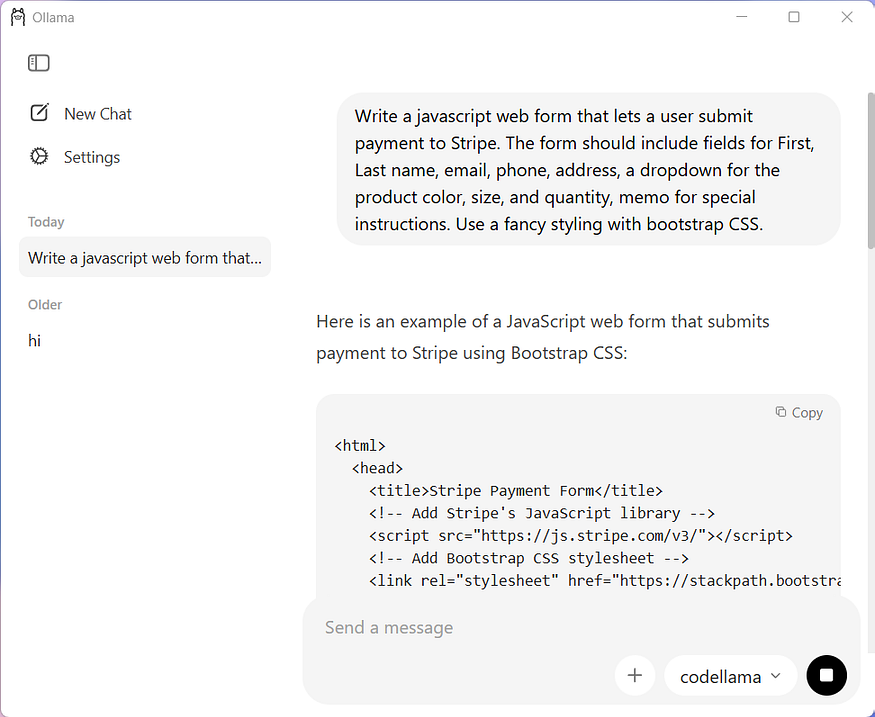
Chatting with Ollama and a locally hosted LLM with codellama. Source: Author.
Downloading a model for Ollama
Along with installing Ollama, you also need to download and install an LLM model.
Many of the models are extremely large. The smallest and, often least capable, can be well over 30 GB. Additionally, they require high levels of CPU/GPU processing power.
It can also run very slowly!
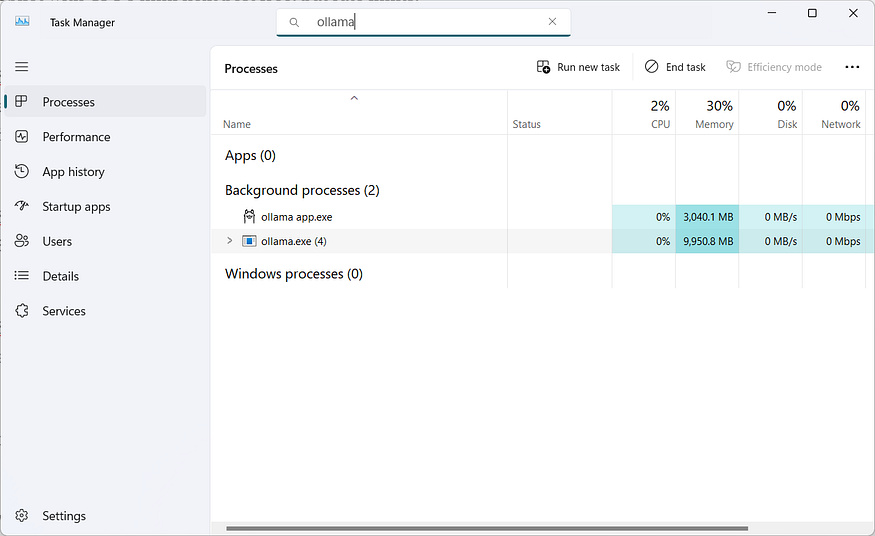
Ollama consuming over 13 GB of memory. Source: Author.
My results with Ollama
I tried Ollama using chat through its built-in UI. Additionally, I’ve configured it with the Continue extension.
Continue is an extension that provides a Copilot interface in VS Code where you can chat just as you would with GitHub Copilot. The difference is that you configure it to use your own LLM service — in this case, my locally hosted Ollama service.
I successfully tested Ollama with llama-3.1:8b (5 GB) and codellama (4 GB) as the backing LLM.
The results were not very impressive, to say the least — poor accuracy and very slow responses. However, it is free and runs on the local PC.
Bottom line: Great for privacy, but slow, resource-heavy, and not competitive with cloud models.
#5 — Openrouter and Devstral 2 2512
If running your own local LLM service is too slow and giving poor results, the next best option is to use a remote one. Even better, some are free!
Openrouter provides an API to access a large variety of pre-trained LLM models. Some of these include top-tier candidates such as OpenAI GPT-5.2, Grok, Claude Opus 4.5, Gemini 3, and many more. The best part is that these huge models run on a remote machine. You don’t have to worry about having enough RAM or CPU, just an Internet connection. Of course, you’ll need to take privacy considerations into account.
Openrouter provides a quota to new users of $1. For perspective, I spent about $0.14/day with light to moderate use in VS Code.
Using the free models
In consideration of cost, I tested using the completely free models. These include some very capable programming LLMs, Devstral 2 2512, Qwen3 Coder 480B, and gpt-oss-120b.
I used the Continue extension in VS Code and configured it with a free model from Openrouter. The results were surprisingly good! In particular, Devstral 2 2512 (free) is a more than capable programming copilot for many tasks.
While the free LLM models are not nearly as good as the latest ones such as GPT 5.2 or Claude Opus 4.5, it’s still a great option for a free LLM alternative to Copilot. Thus, I’d recommend Devstral 2 2512.
Bottom line: Access to powerful models, free, fast, but not as capable as the latest LLMs.
#4 — OpenRouter and Grok 4.1 Fast
After the free LLM models, the next step-up is a paid one.
Prices for using the LLMs can vary depending on which one you select. For example, the top models can be the most expensive (these include Claude Opus, GPT 5.2, and Gemini). To keep costs at a minimum, but still leverage the power of the paid models, I tried out Grok 4.1 Fast.
Grok 4.1 Fast costs $0.20 per million token inputs. By comparison, Claude Opus 4.5 costs $5 per million, Gemini 3 Pro is $2 per million, and GPT-5.2 is $1.75 per million. So, costs differ widely between the paid models — and so does their performance.
I found Grok 4.1 Fast to be a relatively affordable option with excellent results in VS Code. If you’re looking for a middle-ground replacement for Copilot and are not concerned about minor costs, this can be a great option.
Bottom line: Low cost, high accuracy, great performance. Not as good as the paid models.
#3 — GitHub Copilot with GPT-5 Mini
The runner-up for best options is, of course, GitHub Copilot — but using one of their free models.
Many businesses subscribe to the paid plans for GitHub Copilot, which includes the latest LLM models from OpenAI, Anthropic, and Google. Free users of VS Code have access to GitHub Copilot with a limited selection of models. These include Claude Haiku 4.5, GPT-4.1, GPT-4o, GPT-5 Mini.
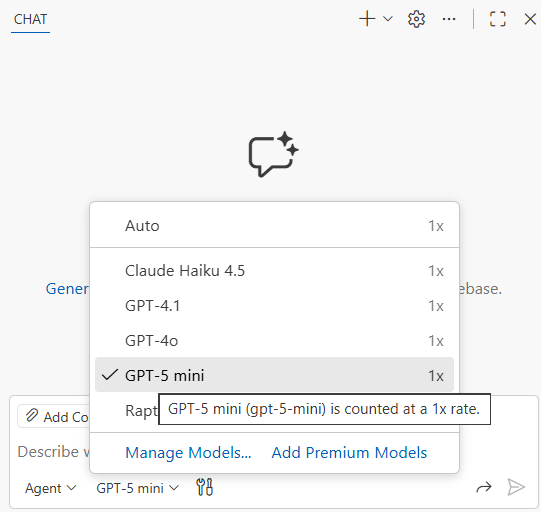
GitHub Copilot in VS Code with free models. Source: Author.
I’ve found GPT-5 Mini to be the next best option for programming in VS Code. While you’ll still be restricted to the chat quota, the results from GitHub Copilot and its tight integration into VS Code outperform the opensource alternatives.
Bottom line: Great integration in VS Code, no installation needed, great performance. Not as good as the larger models. Restricted quota.
#2 — Microsoft Copilot in Edge Browser or Bing
I realize this is not part of VS Code, but I’ve had great results using Copilot in the Microsoft Edge web browser or Bing mobile app.
In the browser, you can open the Copilot chat interface. It functions nearly the same as OpenAI ChatGPT, except built into your web browser. You can copy in your source code, ask for changes or enhancements, and paste back into VS Code to try it out.
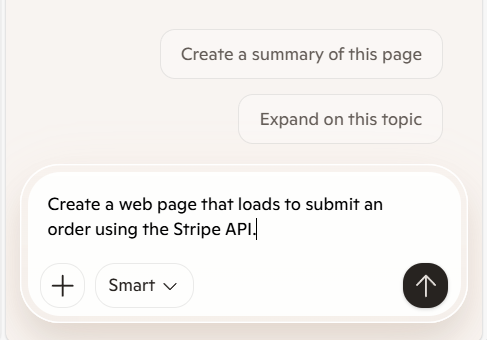
Microsoft Edge web browser Copilot. Source: Author.
While this is a manual process of copy/paste between the web browser and VS Code, it’s still a very powerful option for a semi-replacement in VS Code.
It’s also a great option for quick coding on mobile.
Bottom line: Built into Windows, available on mobile, free, excellent accuracy and performance. Not integrated in VS Code, privacy considerations.
#1 — (Best) GitHub Copilot with Claude Opus 4.5
I found GitHub Copilot with Claude Opus 4.5 to be the best out of the paid enterprise plans.
If you’re subscribed to a paid plan, this is one of the top-tier models for VS Code. I’ve found similar results between Opus 4.5 and GPT-5.2. Both models makes an excellent choice.
Bottom line: The best option for VS Code, but requires a paid Copilot plan.
Conclusion
This sums up my review of GitHub Copilot and its alternatives in VS Code.
The paid models are, of course, the best. However, the free alternatives are not far behind and catching up quickly.
- Best for privacy — Ollama with codellama
- Best for speed — GitHub Copilot with Claude Opus 4.5
- Best for accuracy — GitHub Copilot with Claude Opus 4.5 or Microsoft Edge Copilot
- Best for budget — Continue with Devstral 2 2512
- Best overall — GitHub Copilot with Claude Opus 4.5
Have you tried an alternative to Copilot in VS Code? Let me know in the comments!
About the author
If you’ve enjoyed this article, please consider following me on Medium, Bluesky, LinkedIn, and my website to be notified of my future posts and research work.
More in artificial-intelligence




Cubed
Write about the technologies shaping the future.
For developers, founders, and curious minds exploring AI, crypto, Web3, and emerging tech—signal over noise.
One free account across In Plain English, Stackademic, Venture, and Cubed.
How it works- AI, crypto & Web3
- Software & emerging technologies
- Analysis & practical resources
- Thoughtful voices, not hype
Sign in
Google or GitHub
Complete profile
Takes a few minutes
Get approved & publish
Start sharing
Why write for Cubed?
The future deserves thoughtful voices, not just louder headlines.
Frequently Asked Questions
Common questions about this topic
Which six AI coding tools were tested and reviewed for VS Code alternatives to GitHub Copilot?
The six tools tested were Ollama with Llama 3.1:8b and Codellama (locally hosted, free), Openrouter with Devstral 2 2512 (free), Openrouter with Grok 4.1 Fast (paid), GitHub Copilot with GPT-5 Mini (free model), Microsoft Copilot in the Edge browser or Bing (free), and GitHub Copilot with Claude Opus 4.5 (paid).
What evaluation criteria were used to rank the AI coding tools?
The tools were ranked based on speed, accuracy, cost, privacy, and ease of integration.
What is the Continue extension and how was it used in the testing?
Continue is a VS Code extension that provides a Copilot-like chat interface and was configured to use different LLM services so the reviewer could test each model directly in VS Code.
Why was Ollama with a locally hosted LLM ranked lowest in the review?
Ollama with a locally hosted LLM was ranked lowest because it produced poor accuracy, very slow responses, and was resource-heavy, despite offering strong privacy and being free.
What practical considerations were highlighted about downloading models for Ollama?
Many Ollama models are very large (often over 30 GB for larger models), require significant CPU/GPU resources, can consume large amounts of memory, and can run very slowly on a local PC.
What advantages did Openrouter with Devstral 2 2512 offer?
Openrouter with the free Devstral 2 2512 model offered powerful programming capabilities, good speed, low cost (free to use under Openrouter’s initial quota), and was recommended as a great free alternative to Copilot for many tasks.
How did Grok 4.1 Fast perform and what was its cost model?
Grok 4.1 Fast delivered excellent results at a relatively low cost and was positioned as a middle-ground paid option; it costs $0.20 per million token inputs according to the review.
What are the strengths and limitations of using GitHub Copilot with GPT-5 Mini?
GitHub Copilot with GPT-5 Mini provided tight VS Code integration, strong performance without additional installation, and was one of the best free model options, but it is limited by chat quotas and is not as capable as the larger paid models.
How is Microsoft Copilot in Edge or Bing positioned as an alternative for coding?
Microsoft Copilot in the Edge browser or Bing functions as a powerful, free chat interface that can assist with code via manual copy/paste between the browser and VS Code, is available on mobile, and offers excellent accuracy and performance but lacks direct VS Code integration and raises privacy considerations.
Which option was ranked best overall and why?
GitHub Copilot with Claude Opus 4.5 was ranked best overall because it is a top-tier paid model for VS Code that delivered the highest accuracy and performance in the reviewer’s testing; it requires a paid Copilot plan.
How did the reviewer summarize best choices by category such as privacy, speed, accuracy, budget, and overall?
The reviewer summarized: best for privacy — Ollama with codellama; best for speed — GitHub Copilot with Claude Opus 4.5; best for accuracy — GitHub Copilot with Claude Opus 4.5 or Microsoft Edge Copilot; best for budget — Continue with Devstral 2 2512; best overall — GitHub Copilot with Claude Opus 4.5.
What general conclusion was drawn about paid models versus free alternatives?
The general conclusion was that paid models are the best in terms of capability, but free alternatives are strong, not far behind, and improving quickly.


Comments
Loading comments…